Plan the perimeter as part of the venue
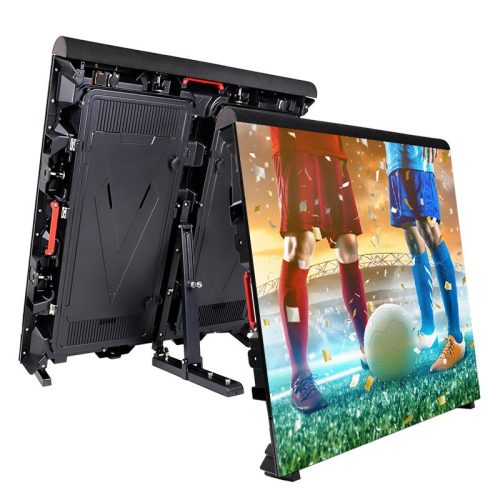
EA960SP4 is EagerLED’s outdoor stadium perimeter display. Its cabinet has an adjustable rear support, a soft display mask and a protective upper cover. The design addresses a screen placed close to a sports field, where the display arrangement has to work with the venue’s activity and access routes. EA960SP4 specs
Begin with a field or arena plan showing the proposed display line. Mark camera positions, spectator areas and openings that staff need to keep accessible. The venue operator should review the arrangement alongside the screen supplier. A cabinet specification alone does not define where the completed system belongs around the playing area.
The stadium displays collection provides the wider category context. For a separate entrance or plaza sign, use the commercial displays collection to define that brief independently. A perimeter cabinet has a different installation role from a sign mounted away from the field.
Preserve the distinction between the P5 configurations
The parameter table lists 960 × 960 mm cabinets weighing 26 kg, with 320 × 160 mm modules. It gives two P5 columns with the same model reference but different LED package designations. Include that designation in the order so the brightness and power values remain identifiable. EA960SP4 specs
| Configuration | Module resolution | Drive mode | Brightness | Maximum / average power |
|---|---|---|---|---|
| EA960SP4-P5, SMD1921 | 64 × 32 pixels | 1/8 duty | 5,500 cd/m² | 550 / 185 W/m² |
| EA960SP4-P5, SMD2727 | 64 × 32 pixels | 1/8 duty | 6,000 cd/m² | 650 / 220 W/m² |
| EA960SP4-P6.67, SMD3535 | 48 × 24 pixels | 1/6 duty | 6,000 cd/m² | 650 / 220 W/m² |
| EA960SP4-P8, SMD3535 | 40 × 20 pixels | 1/5 duty | 5,500 cd/m² | 650 / 220 W/m² |
| EA960SP4-P10, SMD3535 | 32 × 16 pixels | 1/2 duty | 5,800 cd/m² | 630 / 210 W/m² |
These package designations are technical identifiers. They distinguish the entries without implying a component supplier. Ask the quotation to reproduce the selected configuration in full and include the final screen resolution and cabinet count.
Common table entries include a refresh frequency of at least 3,840 Hz, 14-bit grayscale and a 140° viewing angle. Brightness remains model-specific; the general headline value does not apply to every column. EA960SP4 specs
Evaluate the screen from spectator and camera positions
Perimeter advertising often has more than one audience. People in the stands see the display at an angle, while a camera may frame only part of the display line. Bring the intended sponsor graphics and ask for a demonstration that reflects those views. Check lettering and motion that the venue actually plans to use.
For broadcast or recorded events, involve the production team before the configuration is finalized. Ask them to review the chosen operating settings with their camera arrangement. A refresh specification does not independently prove the absence of visible artifacts in every capture mode. Keep a record of the settings and content used for the approved demonstration.
The content team also needs a usable map of the display. Identify any breaks in the perimeter and the way the operator will distribute campaigns across the line. Agree on the delivered file layout and the procedure for replacing a playlist. These operating details should be part of the display handover rather than a task left until the first event.
Bracket adjustment requires a defined support plan
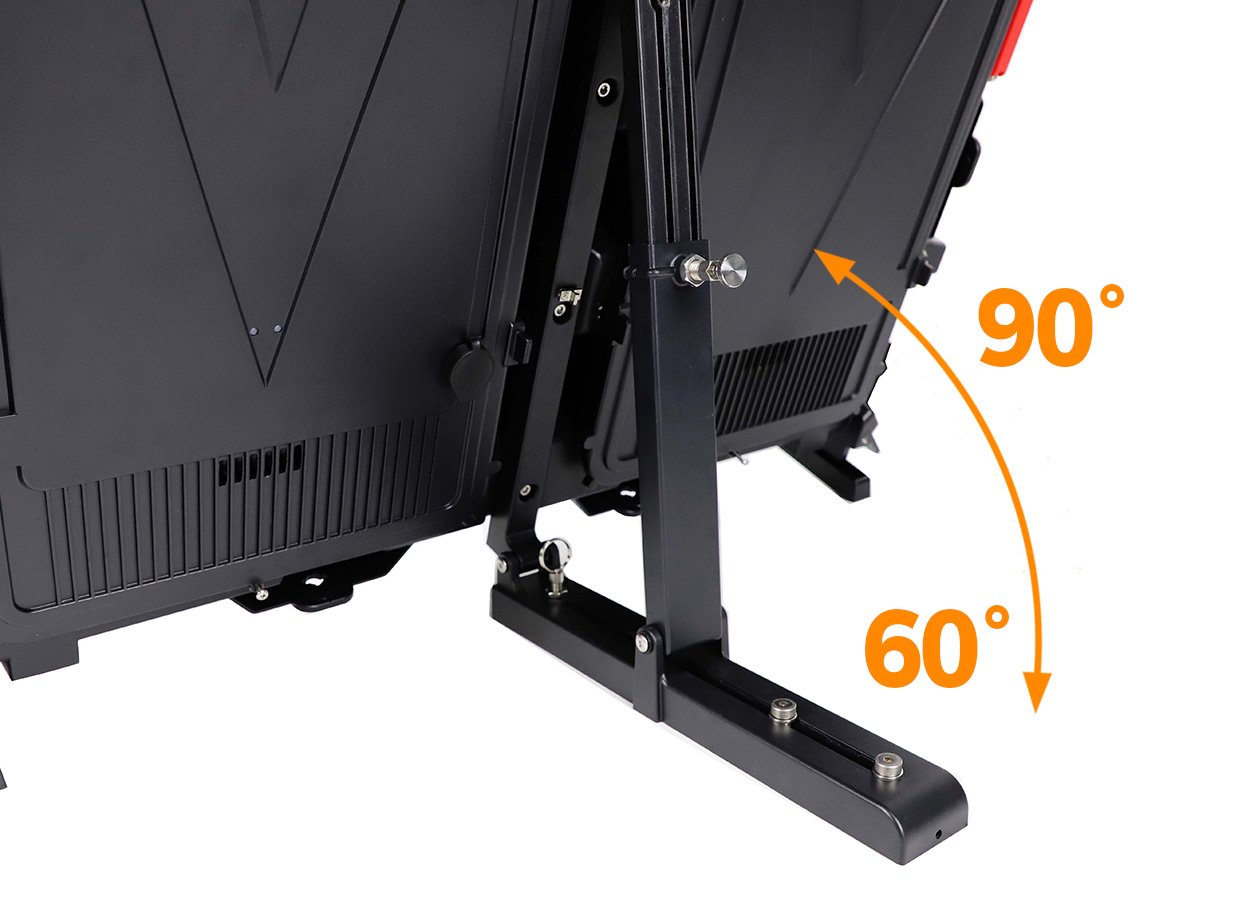
EagerLED describes an independent support structure and a rear bracket adjustable between 60° and 90°. Its imagery shows the bracket mechanism and the product page also mentions a back-frame or suspended installation option. Request the drawing and hardware schedule for the arrangement actually proposed. EA960SP4 specs
Ask the installer to show the rear footprint on the venue plan. The drawing should indicate where staff can walk and how the rear cover opens. Include changes in ground level and the surfaces on which the supports will rest. Confirm who checks the completed installation and which adjustments operators may make during normal use.
If cabinets will be moved between events, request a setup and inspection procedure. The crew should know how to recognize the correct support position and how to report damaged parts. Have the supplier identify the packing and handling equipment included in the quotation. The public product description does not provide a complete event-specific installation method.
Protective features need supporting documentation
The source describes a soft mask and rubber cover intended to reduce the consequences of contact near the field. It also describes a support structure intended to resist impacts. These are manufacturer design descriptions, not an injury-prevention guarantee or certification for a particular venue. EA960SP4 specs
Ask for the applicable test information and have the venue’s responsible team review the proposed assembly and location. Include the intended sport, operating arrangement and any local installation constraints in the request. Review how damaged protective parts will be replaced and who performs the pre-event inspection.
Keep the project’s approval process tied to the actual equipment offered. A promotional image of a stadium cabinet does not establish compliance with a sports body’s requirements. If the venue needs a specific approval, identify it in the brief and request evidence that applies to the supplied system.
Resolve the front and rear protection difference
The page’s overview uses a broad IP65 description, but the parameter table specifies IP65 at the front and IP54 at the rear. The P10 protection cell contains a duplicated text fragment, so request a corrected specification for that exact configuration. This page does not treat the overview as proof of identical protection on both sides. EA960SP4 specs
Share the rear exposure and cable arrangement with EagerLED before commissioning. A perimeter display can leave its back visible and accessible, making the rear enclosure and connections part of the site review. Request the supplier’s instructions for cleaning, weather exposure and inspection of the supplied assembly.
The source describes rear maintenance through an openable back cover. Confirm the working space behind the installed display and ask the technician to demonstrate a replacement task with the support bracket in place. Identify how the venue isolates an affected section while keeping staff informed of its status. EA960SP4 specs
Electrical and operational requirements
The table gives AC 100–240 V at 50–60 Hz and a working-temperature range of −20 to +60°C. Maximum and average power values vary with the selected configuration, as shown in the comparison table. They should stay labeled when transferred to the electrical schedule. EA960SP4 specs
Have the venue and electrical contractor agree on distribution and cable protection for the whole perimeter. Include control equipment and the operator’s location in the system drawing. Explain whether the display remains in place between events or is disconnected and packed away, because the handover instructions should match that operating routine.
A venue that also needs a conventional outdoor billboard can compare EA960R4 for that separate location. For an event background, review the rental display collection. Do not carry the perimeter support arrangement into a different product enquiry without a new installation review.
Details to include in a stadium quotation
| Project question | Evidence or detail to request |
|---|---|
| Venue layout | Display line, access openings, camera positions and rear footprint |
| Configuration | Exact pitch and LED package designation, including the P5 distinction |
| Viewing result | Demonstration with planned sponsor content and capture requirements |
| Support system | Bracket arrangement, mounting hardware and approved setup procedure |
| Protective components | Applicable documentation, inspection method and replacement parts |
| Outdoor exposure | Confirmed front and rear ratings for the offered configuration |
| Operations | Electrical plan, cabinet map, control workflow and maintenance handover |
Send the venue plan through the quote form and ask the supplier to return an itemized system proposal. The product page does not establish a fixed package price, certification status or delivery promise for the project.
EA960SP4 questions
Why do the two P5 columns need separate identification?
Both use EA960SP4-P5 as the model reference, but the source distinguishes SMD1921 and SMD2727 versions. Their published brightness and power values differ. Include the package designation in the quotation and spare-parts schedule. EA960SP4 specs
Does every side have IP65 protection?
The parameter table says IP65 front and IP54 rear, while the overview uses broader wording. Confirm the side-specific ratings for the supplied configuration, including the P10 entry whose table text needs correction. EA960SP4 specs
Does the soft mask guarantee player safety?
No such project-specific guarantee is established here. The source describes protective design features. The venue should request the relevant documentation and review the complete installation for its intended use. EA960SP4 specs
Can the bracket angle be changed?
The source describes an adjustable 60°–90° rear support. Ask for the permitted setup procedure and the support drawing for the supplied system, then include them in the operator’s instructions. EA960SP4 specs
CHECK THE DETAILS
Sources & references
Source pages can change. Access dates record when they were consulted.
- EA960SP4 specs Accessed 28 September 2026
Discuss EA960SP4 for your project.
Share the application, destination and screen dimensions to request a configuration and written quotation.
Request a project quote