A rental cabinet with access from both sides
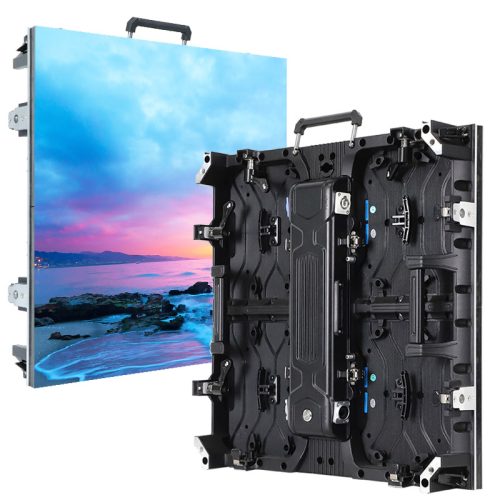
EagerLED’s EA500H8 is a 500 × 500 mm rental display family for indoor and outdoor event walls. The official description combines front and rear maintenance access with magnetic modules, a detachable power box and an optional curved arrangement. It lists stage backdrops, exhibitions and event video walls among the applications. EA500H8 model overview
The family name covers several variants. Select the environment and exact model before accepting a cabinet quantity or price. Keep any alternative proposal separate, with its own model reference and specification, so a later comparison does not mix different versions under the same EA500H8 label.
Cabinet format and the published configurations
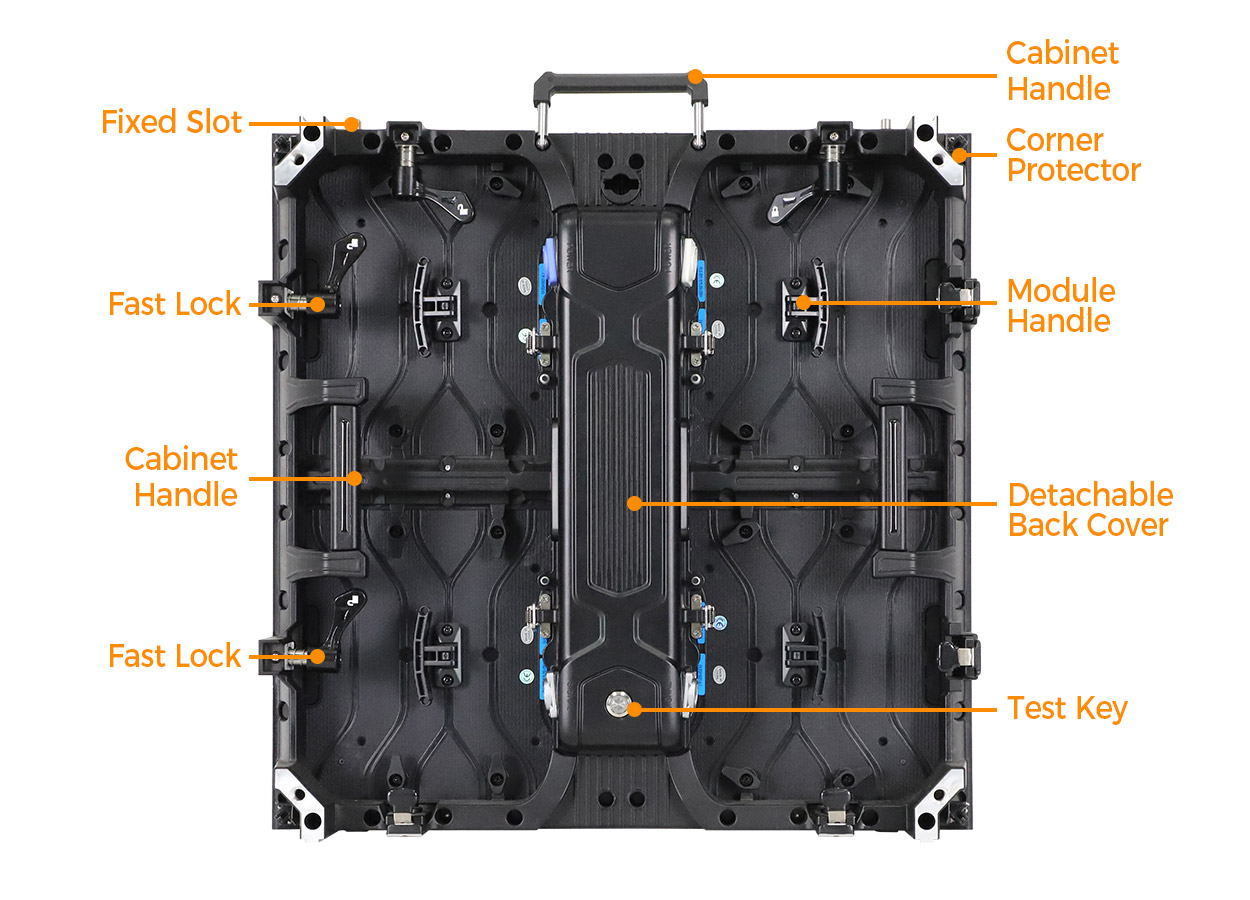
Each EA500H8 cabinet uses 250 × 250 mm modules. EagerLED describes handles, locating slots and quick locks, and lists a cabinet weight of 6.3 kg for indoor versions and 6.5 kg for outdoor versions. The indoor table includes P1.56, P1.95 and P2.6 GOB entries plus P2.97; the outdoor table includes P2.6, P2.97 and two P3.91 entries. Cabinet and variant details
The following selection retains the full model references and their respective brightness and protection entries. It avoids assigning a single maximum value to every cabinet in the family.
| Exact model | Published brightness | Published protection |
|---|---|---|
| EA500H8-iP1.95, indoor GOB | 750 cd/m² | IP31 |
| EA500H8-iP2.6, indoor GOB | 750 cd/m² | IP31 |
| EA500H8-iP2.97, indoor | 750 cd/m² | IP31 |
| EA500H8-OP2.6, outdoor | 4,500 cd/m² | IP65 front, IP54 rear |
| EA500H8-OP3.91-16S, outdoor | 4,800 cd/m² | IP65 front, IP54 rear |
| EA500H8-OP3.91-8S, outdoor | 6,000 cd/m² | IP65 front, IP54 rear |
These figures are taken from the EA500H8 model tables. In particular, retain the 16S or 8S suffix when requesting outdoor P3.91. Those are separate entries with different specifications.
The page specifies a refresh rate of at least 3,840 Hz for the listed models. For a filmed event, include the intended recording workflow in the supplier discussion and request an appropriate demonstration. A published parameter is useful for identifying a configuration, but the project team should still agree on how it will review the completed display. Refresh and event guidance
Review module access and the rear assembly separately
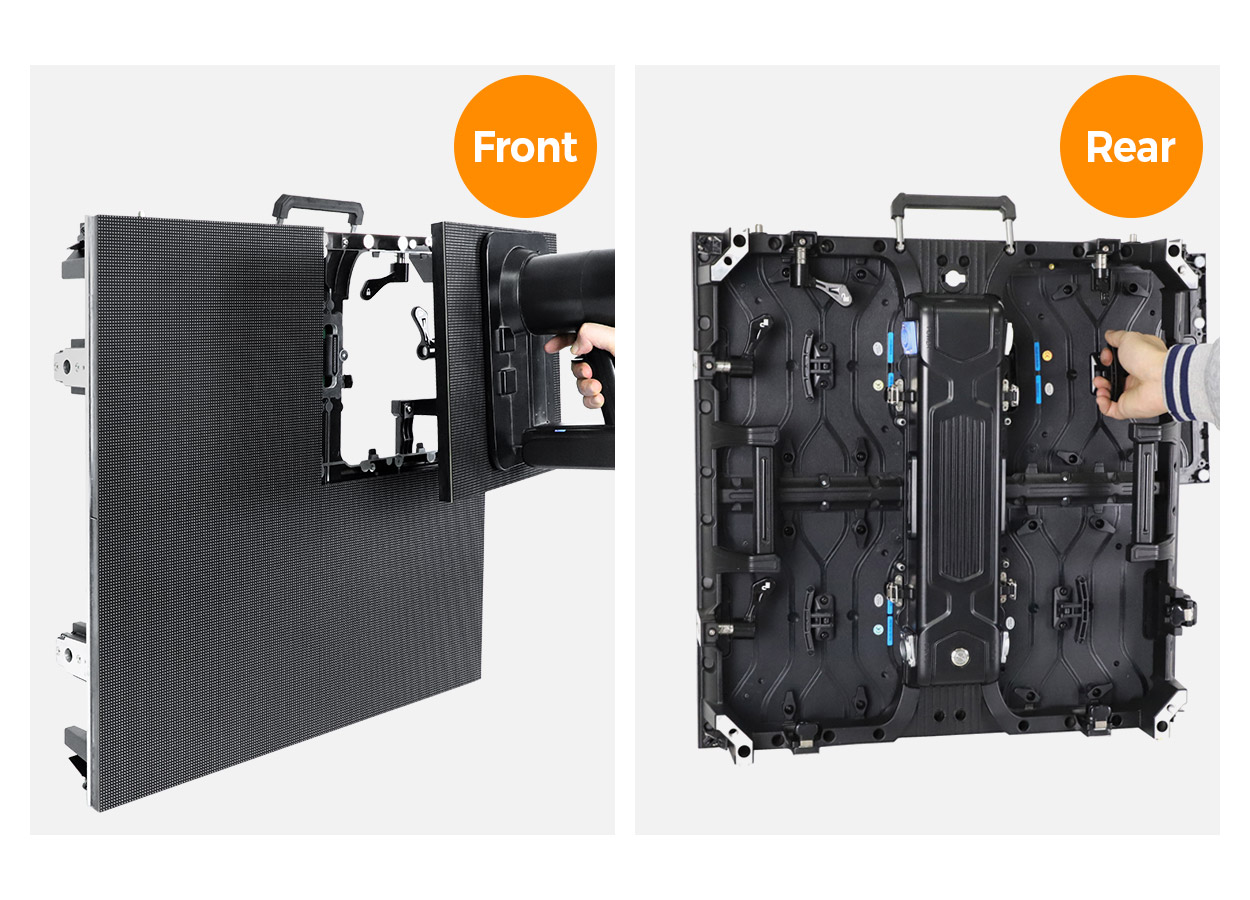
The EA500H8 description identifies magnetic modules and a cabinet designed for service from the front or rear. It also describes a detachable back cover and power box with a quick-release buckle, together with a HUB connection design. The manufacturer asks buyers to confirm the matching power supply, receiving card and spare parts when ordering a fleet. Service and power-box features
Discuss these service areas individually. Ask for a demonstration of module access from the side you expect technicians to use, then review access to the rear assembly in the actual proposed layout. Mark nearby walls, scenery or other obstructions on the project drawing so the supplier can respond to the arrangement you intend to build.
Keep the demonstration linked to the ordered variant. The spare module, service tool and component references should be identified in the handover documents rather than described only by the family name. Ask which tools are supplied and which are expected to be provided by your team.
Curved options and combinations with existing equipment
Curved installation is an option on EA500H8, using a high-precision curve lock. EagerLED asks buyers to specify the curved arrangement in the enquiry and confirm the available angle range and required radius. Optional curved installation
Send the desired curve as a drawing with dimensions and viewing direction. Request the supplier’s proposed cabinet arrangement and the curve-lock configuration needed for it. If the same inventory will also form a flat wall, include that second layout. This gives the equipment schedule a defined purpose and makes the optional hardware visible in the quotation.
The official page also documents mixed layouts with EA500H7, EA500H8V and EA1000H8. It calls for cabinet connections, pitch and control compatibility to be confirmed before different models are assembled together. Mixed cabinet arrangements
For an inventory extension, supply the references from the cabinets you already own. Ask the supplier to confirm the proposed combination in writing. A list of compatible families is useful background, but it should not stand in for identifying the equipment that will be used in the particular wall.
Handling, packing and the demonstration brief
EagerLED identifies four corner guards intended to protect module edges while cabinets are handled, packed and assembled. The product description also points to quick locks, handles and locating slots as cabinet features. Handling details
Keep the transport information separate from the product parameter table. Ask for the packed quantities, dimensions and weights of the proposed shipment and confirm the delivery destination. A bare cabinet weight is not a quotation for moving the full package.
Put the operating package into the quotation
The following schedule records buyer decisions. It is not a list of items supplied as standard with every EA500H8 cabinet.
| Area to define | Information for the enquiry | Item to verify in the offer |
|---|---|---|
| Display selection | Environment, audience position and content | Full indoor or outdoor model reference |
| Cabinet arrangement | Screen dimensions and all intended shapes | Drawing and cabinet quantities |
| Curved option | Required curve and alternate flat layout | Named curve-lock hardware |
| Service package | Intended access and requested spare components | Tool and spare-part references |
| Mixed inventory | Existing cabinet models and configurations | Written combination confirmation |
| Delivery and handover | Destination and team responsibilities | Packing details and agreed support scope |
Compare offers only after checking that the model and requested equipment are the same. Record any proposed substitution in the equipment schedule. Use the rental display cost guide to organize wider purchase categories, and submit the complete brief through the project quote form.
Frequently asked questions
Is front maintenance available on EA500H8?
Yes. EagerLED describes magnetic LED modules and front and rear service access. Confirm the service tools and replacement modules for the selected pitch, and review access in the actual display layout. Maintenance description
Is the curve lock included automatically?
The official page calls curved installation optional. Specify it in the enquiry and have the required lock configuration named in the quotation. Curve-lock option
Which other rental cabinets are named for mixed layouts?
EagerLED names EA500H7, EA500H8V and EA1000H8. The page asks for connections, pitch and control compatibility to be confirmed for the proposed combination. Compatible families
What distinguishes the indoor and outdoor cabinet weights?
The official cabinet description and tables list 6.3 kg for indoor versions and 6.5 kg for outdoor versions. Obtain shipment details separately when arranging transport. Cabinet weights
What should the first quotation request include?
Send the chosen environment, finished dimensions, content examples and delivery destination. Add the required flat or curved arrangements and state whether the request covers cabinets alone or a complete operating package. This gives the supplier a defined scope for its written response.
CHECK THE DETAILS
Sources & references
Source pages can change. Access dates record when they were consulted.
- EA500H8 specifications Accessed 23 September 2026
Discuss EA500H8 for your project.
Share the application, destination and screen dimensions to request a configuration and written quotation.
Request a project quote