Put the display where visitors check in
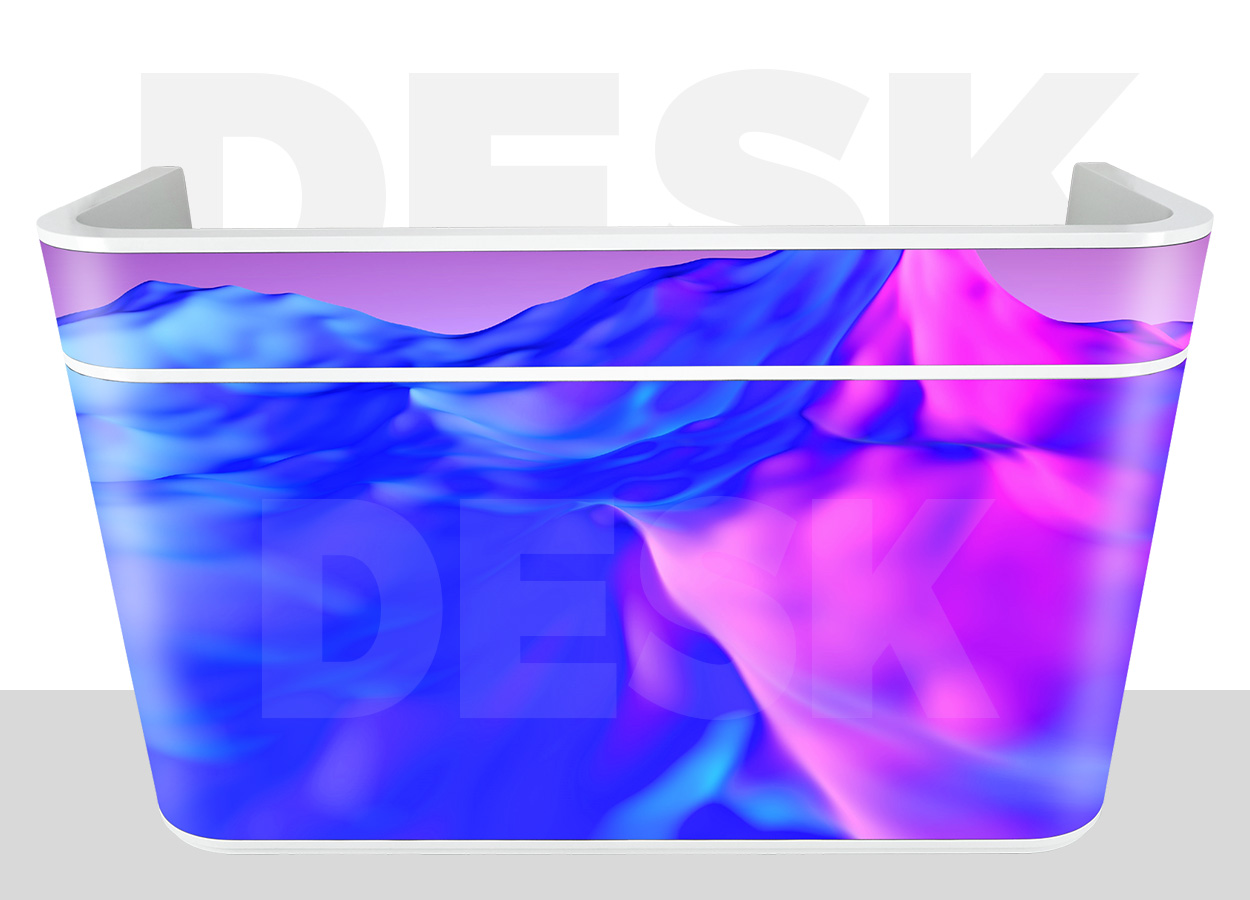
The EA-FD combines an indoor reception desk and an LED display in one piece of furniture. Its curved screen faces arriving visitors, while drawers and a worktop support the person behind the counter. EagerLED lists company lobbies, hotel receptions and public-service counters as applications. The useful distinction is the position of the image: branding appears at the point where visitors stop to speak to staff. EA-FD product details.
Plan the counter around the reception task first. Staff need space to greet visitors, use their equipment and open storage without obstructing the route behind the desk. Visitors need a clear approach. The screen then provides a place for a welcome message, venue identity or short promotional sequence. A long information directory may work better on a separate indoor LED screen where people can pause without blocking check-in.
EagerLED documents two cabinet designs and three display sizes. That makes the desk a configurable product rather than one fixed piece of furniture. Ask for the drawing of the actual design you intend to order, with the screen surface, counter outline, storage and cable exit marked separately. EA-FD designs
Compare the three GOB pitch options
All three EA-FD variants use 320 × 160 mm GOB modules. The manufacturer describes the modules as flexible to follow the counter’s curve. Pitch changes the module pixel matrix, while the published brightness remains 600 cd/m². EA-FD pitch specifications.
| Variant | Module resolution | Listed pixel density | Listed brightness | Driving duty |
|---|---|---|---|---|
| P1.53 GOB | 208 × 104 pixels | 422,500 pixels/m² | 600 cd/m² | 1/52 |
| P1.86 GOB | 172 × 86 pixels | 288,906 pixels/m² | 600 cd/m² | 1/43 |
| P2.5 GOB | 128 × 64 pixels | 160,000 pixels/m² | 600 cd/m² | 1/32 |
Choose with an example of the content at the nearest regular viewing position. A compact company name, a finely drawn logo and a moving background make different demands on the pixel matrix. Test the smallest lettering you actually need. Choosing the smallest pitch without reviewing the content can add detail that the design never uses; selecting a coarser pitch for small text can leave the operator redesigning every slide.
The common specification includes a 140° viewing angle, refresh frequency of at least 3840 Hz and a 12–16-bit grayscale entry. Request the delivered grayscale configuration rather than treating the listed range as one setting. For a filmed reception or event, check the display with the intended camera and exposure settings during acceptance. A refresh specification alone does not establish the result of that camera test. EA-FD image parameters
The source repeats the same cabinet-resolution values under all three pitches even though the module resolutions differ. Those repeated values should not become the artwork specification. Obtain the confirmed full-screen pixel matrix for the selected pitch and size before preparing final content.
Separate screen area from the desk footprint
The display-size entry describes the LED surface. The overall cabinet dimensions describe the physical counter. The two measurements differ substantially on a curved desk, so neither a floor plan nor a content canvas should be prepared from the other. The source lists the following sets in order. EA-FD size table.
| Published size entry | LED display size | Cabinet dimensions, L × H × D | Listed cabinet weight | Maximum / average power per set |
|---|---|---|---|---|
| First size | 1920 × 960 mm | 1065 × 1100 × 585 mm | 97 kg | 550 / 185 W |
| Second size | 2240 × 960 mm | 1360 × 1100 × 585 mm | 115 kg | 650 / 220 W |
| Third size | 2560 × 960 mm | 1675 × 1100 × 585 mm | 130 kg | 750 / 250 W |
Confirm this size-to-design mapping on the supplier’s drawing, particularly the meaning of display length around the curved face. The table does not provide a plan view for both designs. Leave working clearance behind the counter and check the space swept by drawers. A display that fits in the visible lobby opening may still interfere with the staff entrance or a nearby door.
The listed weights also matter during delivery. Casters support repositioning, but they do not remove the need to check lifts, floor transitions and the unloading route. Record the narrowest doorway and any ramp or threshold before specifying the transport case. Obtain the complete packed dimensions and gross weight from the shipping proposal.
Front maintenance and daily operation
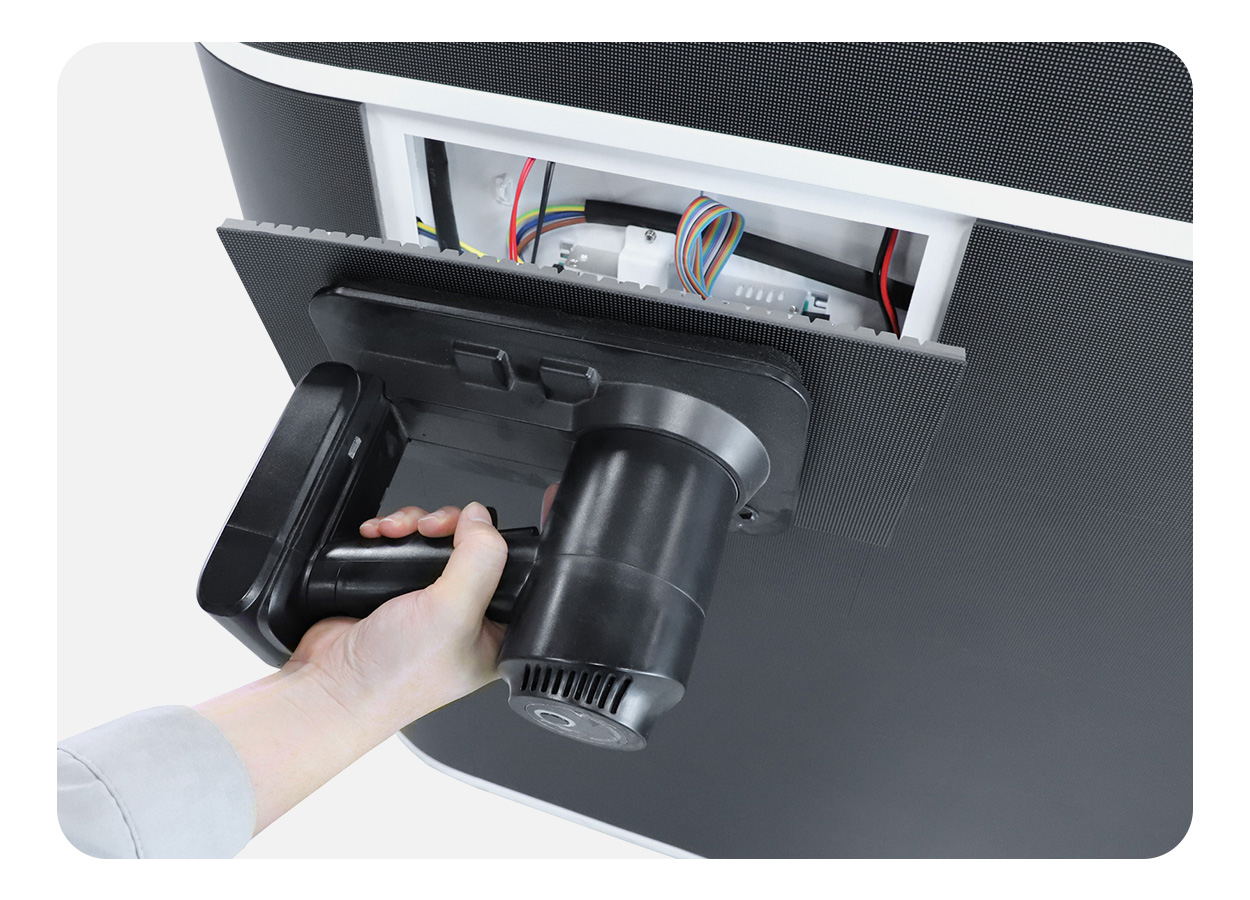
The EA-FD uses suction-cup front access. A technician removes the LED module from the visitor side rather than dismantling the desk. Keep a usable working area in front of the display and avoid permanent trim that traps module edges. Ask for the removal procedure and the service tool intended for the supplied surface. Front-access arrangement.
Reception staff also need an ordinary operating routine. Agree who starts the display, how content is loaded and where approved files are stored. EagerLED describes plug-and-play operation, but the content input arrangement and control equipment should still appear in the order. Have the supplier demonstrate a restart with the final playlist so staff can recover after the desk is unplugged or moved.
Two built-in power sockets can be configured for US, EU, UK or Chinese plug standards. Specify the destination and the equipment staff expect to connect. Ask for the socket ratings and the complete electrical arrangement; the display’s power table does not establish the available socket capacity. The listed display input is AC 100–240 V, 50–60 Hz. EA-FD electrical details
The source lists IP43 and describes this as an indoor counter. GOB encapsulation should not be read as permission for outdoor exposure or a wash-down cleaning method. Obtain the approved cleaning instructions, especially for the illuminated surface and the joints beside the worktop. EA-FD indoor protection
Match the desk to the job
| Reception requirement | EA-FD configuration point | Decision to settle before ordering |
|---|---|---|
| Visitors approach close to the front | Three GOB pitch choices | Review the smallest text at the actual approach distance |
| Staff use the counter all day | Two designs, drawers and worktop | Approve staff clearance, storage access and equipment positions |
| Desk moves between indoor events | Casters and optional custom flight case | Check the full handling route and transport dimensions |
| Power accessories stay on the desk | Two customizable sockets | Specify plug standard and confirm socket load limits |
| Brand animation wraps around the face | Flexible modules and curved display | Obtain the final pixel canvas and content-mapping instructions |
A presentation position has different needs from a reception station. The EA-PD podium is a relevant format to compare when the user stands at a lectern. For a separate vertical message beside the desk, compare the EA1920IP5 poster. These comparisons help define whether the display should be part of the furniture or an independent sign.
Specify the complete reception package
Send the chosen design, display size and pitch with a floor plan and photographs of the entrance. Include the staff-side layout, preferred socket standard, content example and delivery route. State whether the desk will stay in place or travel between venues. For travel, identify the custom flight case as a separate requested item and confirm its loading procedure.
A configuration quote should identify the complete desk, playback equipment, service tool, spares and transport packaging. Ask for a labeled drawing and the confirmed screen resolution with the proposal. These details allow the furniture layout and content work to proceed from the same specification.
EA-FD questions
Can a reception desk be moved after installation?
The manufacturer provides bottom-mounted casters for repositioning. Check the floor, cable disconnection procedure and route before moving it. The published cabinet weights run from 97 to 130 kg, so plan handling around the selected size. EA-FD weight table
Does every pitch include GOB?
Yes. The EA-FD table labels P1.53, P1.86 and P2.5 as GOB. Retain that label and the exact pitch on the order and spare-module list. EA-FD pitch specifications
Is the optional case included automatically?
The manufacturer describes a custom flight case with sides that form a loading ramp. Confirm inclusion, packed size and gross weight in the quote rather than assuming the desk price includes it.
What must the designer know before making artwork?
The designer needs the confirmed pixel matrix and the mapping of the curved screen. Physical display dimensions alone do not define the file resolution. The repeated cabinet-resolution row in the public table requires configuration-specific confirmation.
Can the front screen be serviced while the desk stays in position?
The documented suction-cup front access supports service from the viewing side. Keep that area clear, retain the specified tool and ask the supplier to demonstrate removal on the delivered configuration.
CHECK THE DETAILS
Sources & references
Source pages can change. Access dates record when they were consulted.
- EA-FD specifications Accessed 28 September 2026
Discuss EA-FD for your project.
Share the application, destination and screen dimensions to request a configuration and written quotation.
Request a project quote