Define what the lectern must do
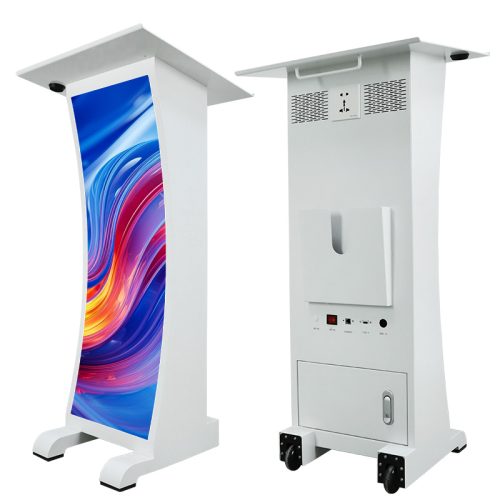
The EA-PD combines an indoor LED display with a lectern cabinet, work surface, power outlets, data interfaces, storage and wheels. EagerLED documents two display widths and two pixel pitches, with front-service GOB modules. Its stated applications include conference rooms, auditoriums, schools, houses of worship and event stages. See the EA-PD product description for the manufacturer’s configuration details.
Write the brief from both sides of the podium. For the audience, decide whether the front should show a logo, speaker name, session title or changing announcement. For the presenter, list the equipment that needs space, power and connections. The source identifies a work surface and storage, but the buyer should still request their dimensions and the layout of the offered cabinet.
Include the events between events. A permanent lecture room may leave the lectern in one position; a venue sharing it between rooms needs a storage location, a movement route and a repeatable setup procedure. Record those requirements before choosing display width. They affect the equipment and service scope even when the same pitch is used.
Choose width and pitch as separate options
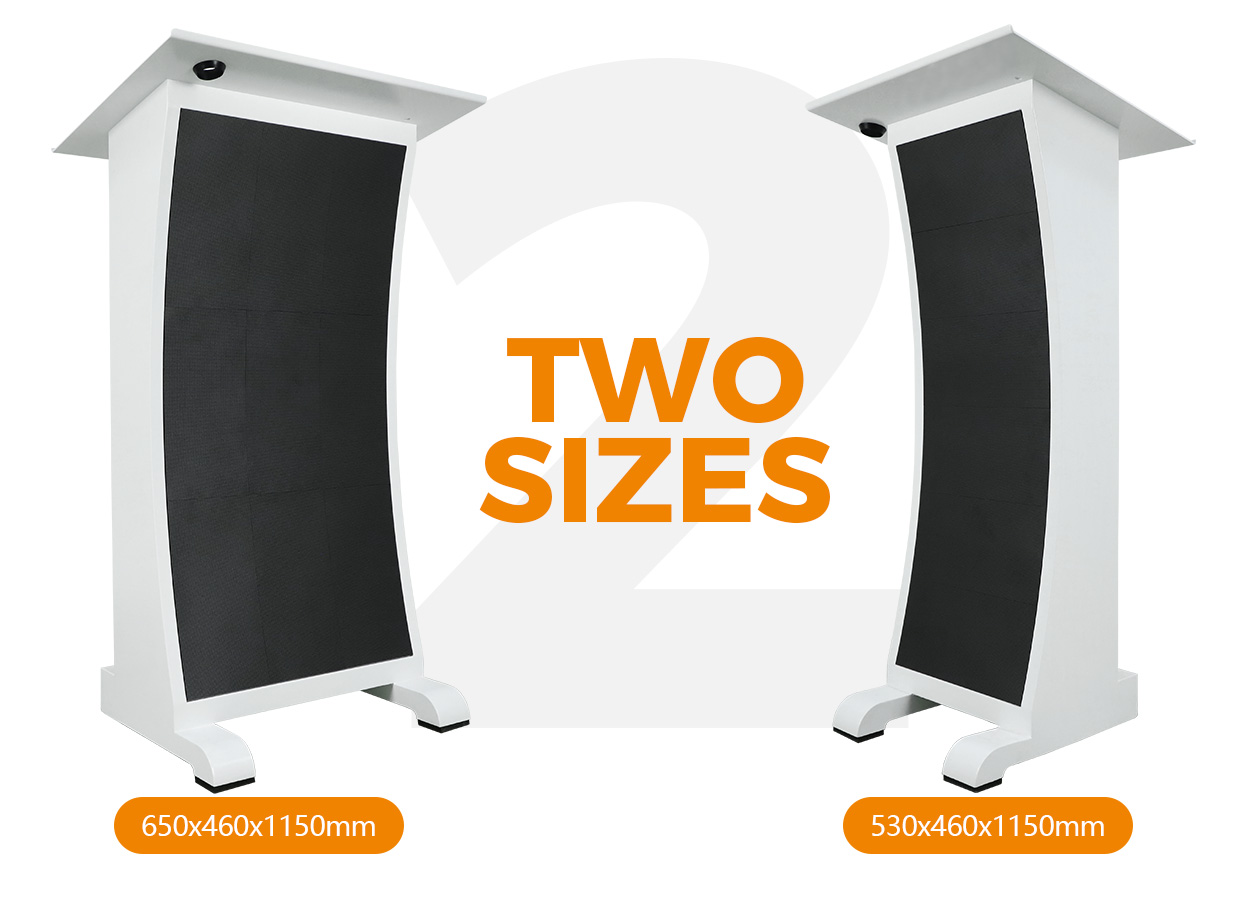
Both P1.53 and P1.86 are available with a 320 × 960 mm or 480 × 960 mm display. The narrower display uses a 530 × 460 × 1150 mm cabinet; the wider display uses a 650 × 460 × 1150 mm cabinet. Cabinet dimensions are length × depth × height in the source. The display size describes the illuminated front, so it should not be used as the complete floor footprint.
| Documented model | Display width × height | Display resolution | Cabinet weight |
|---|---|---|---|
| EA-PD-P1.53-320 | 320 × 960 mm | 208 × 624 pixels | 24 kg |
| EA-PD-P1.53-480 | 480 × 960 mm | 312 × 624 pixels | 29.6 kg |
| EA-PD-P1.86-320 | 320 × 960 mm | 172 × 516 pixels | 24 kg |
| EA-PD-P1.86-480 | 480 × 960 mm | 258 × 516 pixels | 29.6 kg |
All four entries are GOB configurations using 320 × 160 mm modules. The table lists 600 cd/m² brightness, a 140° viewing angle and a refresh frequency of at least 3840 Hz throughout. It gives a grayscale range of 12–16 bits; ask which setting is supplied for the proposed control configuration. EA-PD variant table.
The 320 mm-wide models list 90 W/set maximum and 30 W/set average power. The 480 mm-wide models list 140 W/set maximum and 50 W/set average. All four list AC100–240 V, 50–60 Hz. Confirm with the supplier how these display figures relate to equipment plugged into the lectern’s outlets, then give the installer a complete equipment list. Do not treat the display’s average power as the total demand of a presenter workstation.
Design the front display around its pixel map
Use the selected resolution when making the first content sample. A speaker name that fits the 480 mm-wide version should also be tested separately if the narrower model remains under consideration. Ask the designer to show the longest likely name, an organization mark and a two-line session title at their intended sizes. Review them from the nearest and farthest seats that matter to the event.
Decide who changes the front display during a programme. A single logo may need only an opening check, while a sequence of speakers needs a clear cue and an agreed person to operate it. Prepare a neutral holding image for intervals and an approved way to correct a name or title. These are operating choices to settle with the event team; they do not establish that a particular automation feature comes with the product.
The pixel pitch guide can help structure the viewing review. Keep an approved template for the ordered resolution so later staff can prepare content without guessing its dimensions. If the podium will appear on camera, include the intended camera and lighting arrangement in the demonstration rather than accepting a filming result solely from a refresh-rate figure.
Leave room for positioning and front service
The manufacturer describes a wheeled cabinet that can be positioned by one person. That statement concerns positioning; it does not establish a lifting method, stair-handling procedure or transport arrangement for every venue. Check the route between storage and the stage with the chosen cabinet dimensions and weight. Request instructions for securing the wheels in use and for packing the lectern when it travels.
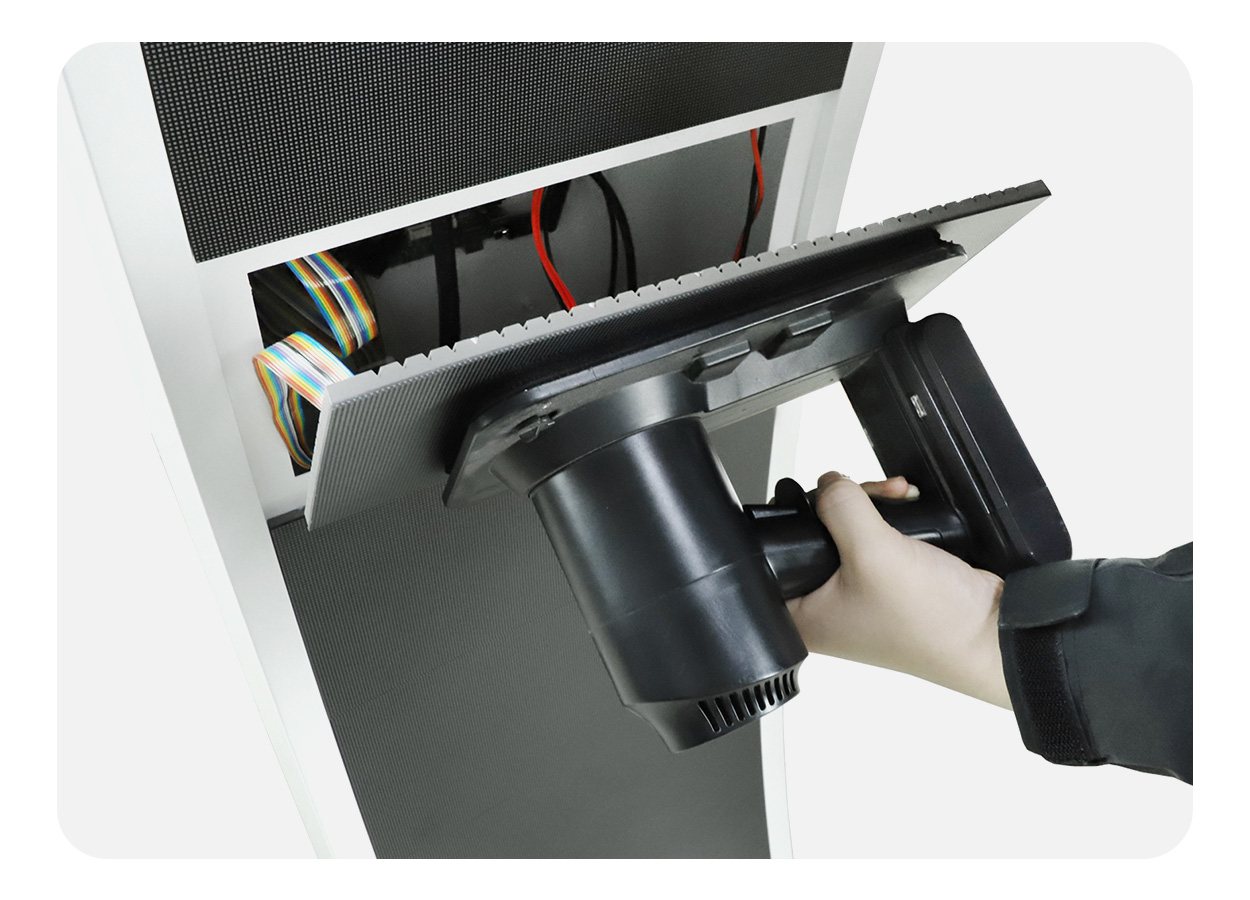
Front service gives access to the LED modules from the display face without a rear service aisle. Preserve enough working space at the front for the specified removal procedure. Ask how decorative event panels, stage furniture or nearby barriers should be arranged so they do not obstruct access. Obtain the module identifiers, removal tools and service instructions with the delivered unit. Front-service details.
The GOB description concerns protection of the LED surface, while the complete product table lists IP43 and the page identifies the EA-PD for indoor use. Keep those statements in their documented scope. Neither the encapsulation description nor an operating-temperature range is a basis for promising outdoor operation or unrestricted liquid exposure.
Before the first event, have the presenter try the work surface and planned equipment arrangement. Check where notes, a laptop and required accessories will sit, then confirm cable routing with the venue team. Retain a setup photograph and connection diagram once the arrangement is accepted. Our maintenance planning guide covers service and transport responsibilities to include in the handover.
Ask for a complete presentation package
The source documents power outlets and multiple data interfaces but does not enumerate the exact connectors, outlet ratings, audio equipment or playback controller included. A microphone, speaker, camera or laptop should appear in the quote if it is part of the required package. Ask for a connection drawing for the offered unit and identify which accessories the venue will provide.
| Part of the brief | Confirmation to request |
|---|---|
| Presenter equipment | Work-surface and storage dimensions, cable openings and the agreed equipment layout |
| Electrical arrangement | Outlet type and rating, inlet requirements and the complete connected load |
| Front-display playback | Controller, content-loading method, file requirements and operator access |
| Event changeovers | Demonstration of changing a speaker title and returning to the holding image |
| Movement and storage | Wheel procedure, packed dimensions, protective packing and transport instructions |
| Service support | Spare modules, removal tools, warranty scope and support contact procedure |
Use the quote comparison guide to compare a consistent scope: podium configuration, control equipment, accessories, packing, delivery and commissioning. The source supplies technical information without establishing a current price, stock level or delivery commitment. A project quote should name the full model and the equipment the presenter intends to use.
EA-PD questions
Are both display widths offered in both pitches?
Yes. The official table lists four combinations: P1.53 and P1.86, each with 320 × 960 mm and 480 × 960 mm displays. Keep the pitch and width suffix together on the order.
Is the cabinet only 320 or 480 mm wide?
Those are display widths. The corresponding cabinet widths are 530 and 650 mm, with a documented depth of 460 mm and height of 1150 mm.
Does the podium include a microphone and sound system?
The technical description does not establish those inclusions. Specify the audio equipment required and ask the supplier to identify what is supplied, what connects to the lectern and what the venue must provide.
Can it be moved between meeting rooms?
The source documents wheels and single-person positioning. Check the actual route and obtain handling instructions for the selected size; steps, loading and transport need their own arrangements.
What should staff demonstrate at handover?
Have the operator load the approved content, change a speaker title and restore the holding image. Check the agreed presenter connections and retain the wiring diagram, content template and service instructions.
CHECK THE DETAILS
Sources & references
Source pages can change. Access dates record when they were consulted.
- EA-PD specifications Accessed 23 September 2026
Discuss EA-PD for your project.
Share the application, destination and screen dimensions to request a configuration and written quotation.
Request a project quote