Extend a rental inventory around the actual wall layouts
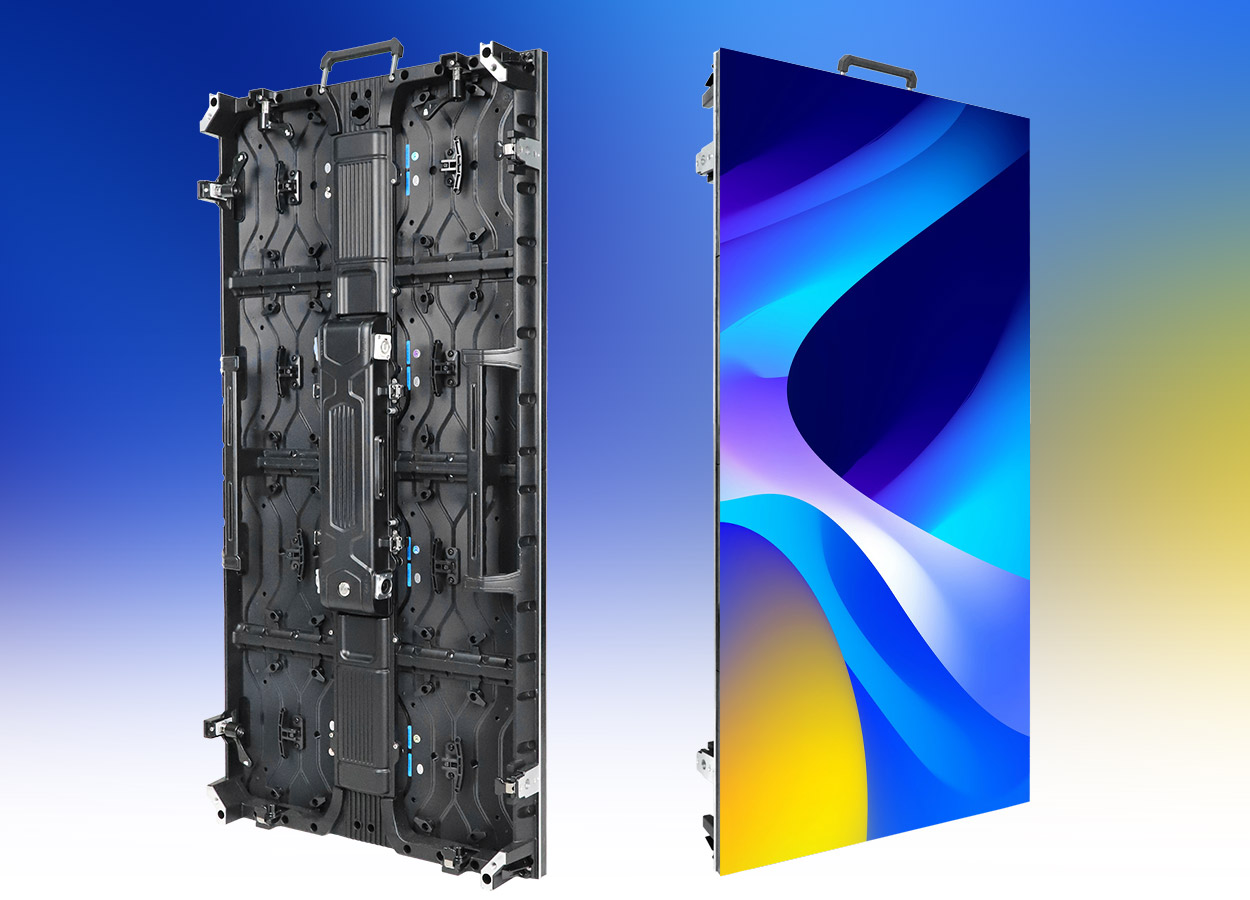
The EagerLED EA1000H8 is a rental LED board family with indoor and outdoor configurations. The cabinet combines magnetic modules, front and rear maintenance access, a detachable power box and handling features for repeated event work. EagerLED also documents mixed assembly with smaller cabinets and an optional curve lock. That combination makes the model worth examining when an existing rental inventory needs taller sections or a wider choice of scenic layouts. EA1000H8 rental cabinet overview
Start with the layouts your team expects to build. A conference backdrop, an exhibition stand and an outdoor performance may use the same family name while requiring different variants and equipment. Give each proposed wall its own drawing and operating brief. You can then establish which cabinets and accessories carry across the layouts, which need to remain separate, and what the crew will need to identify at the warehouse.
Resolve the cabinet-size caption before ordering
The product heading identifies EA1000H8 as a 500 × 1000 mm board, and the cabinet-size rows in both specification tables also state 500 × 1000 mm. However, the table captions say “500x500.” This page uses the size stated in the heading and detailed rows, while retaining the discrepancy as a point for written confirmation. Ask EagerLED for the final dimensioned cabinet drawing before approving the wall arrangement. EA1000H8 dimension conflict
The listed module size is 250 × 250 mm across the indoor and outdoor variants. That is a module dimension, not the cabinet dimension. Keep the cabinet drawing, module reference and finished display drawing together so a size copied from the wrong field does not become part of the installation brief. EA1000H8 module and cabinet dimensions
The distinction also matters when extending an existing fleet. Check the full model references on the equipment already in service. A matching family name in a catalogue is useful for shortlisting, but the combination still needs agreement on the mechanical connections, pixel pitch and control configuration.
Indoor and outdoor specifications remain separate
The following table preserves the source model suffixes. GOB appears in the source pitch labels for the first indoor entries. Brightness is a published configuration value; it should remain attached to the exact variant in the equipment schedule.
| Exact EA1000H8 model | Published pitch label | Brightness | Cabinet weight | Protection |
|---|---|---|---|---|
| EA1000H8-iP1.56 | P1.56 GOB | 700 cd/m² | 10.8 kg | IP31 |
| EA1000H8-iP1.95 | P1.95 GOB | 750 cd/m² | 10.8 kg | IP31 |
| EA1000H8-iP2.6 | P2.6 GOB | 750 cd/m² | 10.8 kg | IP31 |
| EA1000H8-iP2.97 | P2.97 | 750 cd/m² | 10.8 kg | IP31 |
| EA1000H8-OP2.6 | P2.6 | 4,500 cd/m² | 12 kg | IP65 front, IP54 rear |
| EA1000H8-OP2.97 | P2.97 | 4,500 cd/m² | 12 kg | IP65 front, IP54 rear |
| EA1000H8-OP3.91-16S | P3.91 | 4,800 cd/m² | 12 kg | IP65 front, IP54 rear |
| EA1000H8-OP3.91-8S | P3.91 | 6,000 cd/m² | 12 kg | IP65 front, IP54 rear |
Values come from the EA1000H8 specifications. The outdoor P3.91 entries have different suffixes and brightness figures. Keep those suffixes in the purchase documents, spare-parts list and asset labels rather than reducing both entries to a generic P3.91 description.
The source lists a viewing angle of 140° and refresh frequency of at least 3,840 Hz for the tabled configurations. For recorded performances, EagerLED specifically advises testing receiving-card settings, camera shutter and source video together. Include your intended camera workflow in the demonstration brief instead of treating refresh frequency as a complete prediction of the recorded result. EA1000H8 viewing and camera guidance
Use mixed cabinets to solve a defined shape
EagerLED names EA500H8, EA500H8V and EA500H7 as families for mixed assembly with EA1000H8. It also asks buyers to confirm cabinet, module and control-system compatibility before combining them. EA1000H8 mixed assembly
For a fleet extension, send photographs of the existing cabinet labels alongside the proposed layout. Mark where the tall cabinets meet the smaller units and identify any stepped edges or separate screen sections. Ask the supplier to return a configuration tied to those existing references. This is more useful than requesting a broad assurance that the families can connect.
Review the EA500H8 service and variant guide if that cabinet is already part of the inventory. The rental LED display collection provides other formats to compare when the intended arrangement is still open. Neither a related page nor a common cabinet size establishes that an unlisted combination will work.
Keep optional curves visible in the equipment list
Curved assembly uses an optional high-precision curve lock. The official description does not provide a fixed angle range or a minimum radius for every EA1000H8 configuration; it asks buyers to confirm the suitable lock and supported angles for the requested shape. EA1000H8 curve-lock option
Show the curve in plan view and indicate which way the audience faces. If the equipment will also make a flat wall, include that arrangement in the same enquiry. Ask for the lock reference and setup instructions for each approved configuration. Your crew then has an agreed build to follow when equipment returns to the warehouse and leaves for another venue.
Do the same for the structure that supports the screen. The cabinet arrangement and the supporting system should appear in the project documentation together. A rendering of a curved image does not show the access route, support positions or the space needed to assemble and dismantle the wall.
Separate module access from power-box access
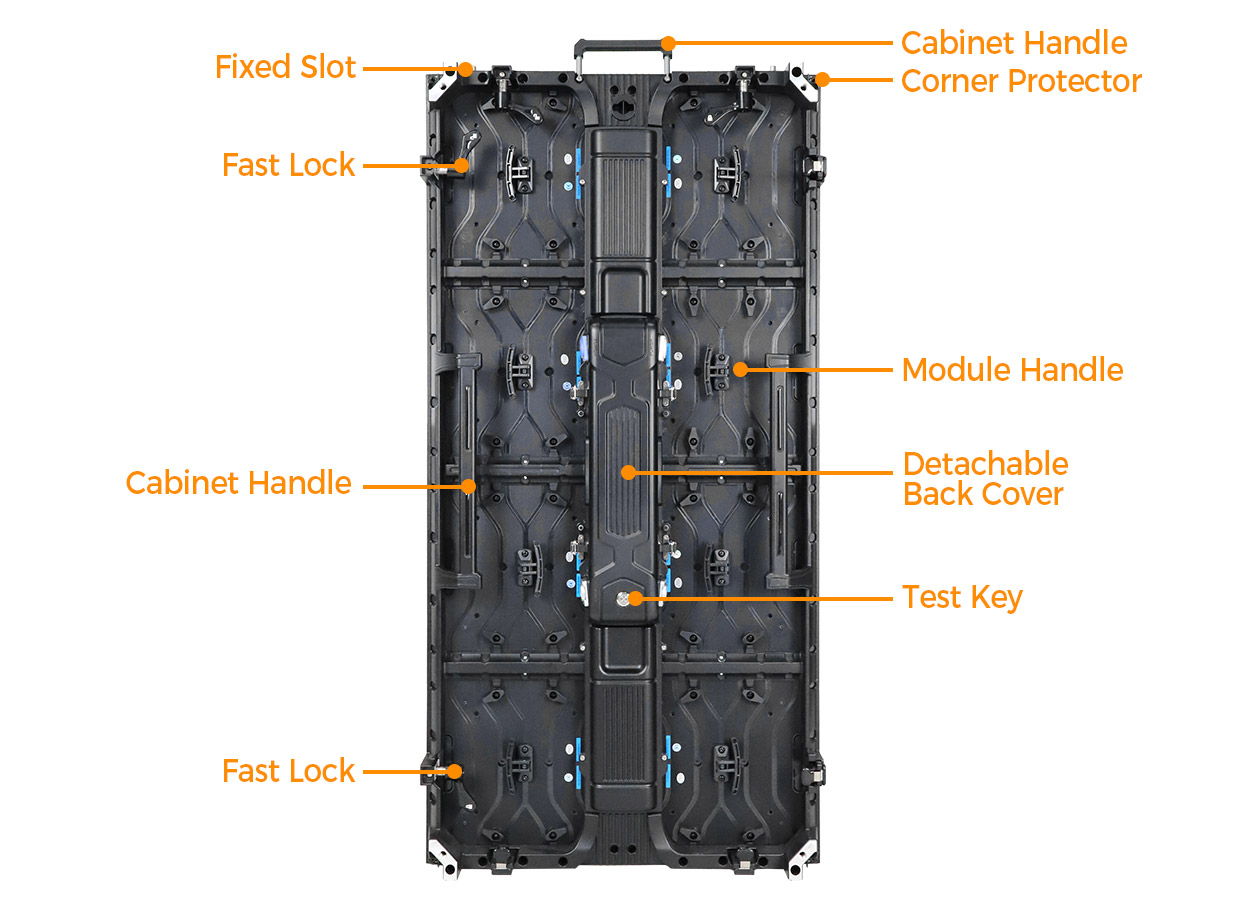
EA1000H8 uses magnetic modules and supports front and rear maintenance. Its detachable rear assembly uses a quick-release buckle and a HUB connection design. Handles, fixing slots, quick locks and corner protectors also appear in the cabinet description. EA1000H8 service and handling features
Ask the supplier to demonstrate the maintenance tasks your technicians expect to perform. Show the proposed backstage obstructions and the space in front of the screen. Confirm which tools remove a module and what clearance is needed to release the rear assembly. Record the approved replacement parts by the ordered configuration so warehouse staff can prepare the right service kit.
The same demonstration can cover packing and handling. Check how the protectors are positioned before transport and which surfaces the cases support. Request the packed shipment information separately from cabinet weight, then compare it with the venue access and unloading plan. Retain a written inspection procedure for equipment returning from a rental, including locks, connections and module edges.
Decisions to record in the project brief
| Decision | Information to supply | Evidence to request |
|---|---|---|
| Select an indoor or outdoor variant | Venue conditions, audience positions and content examples | Full model suffix and matching specification sheet |
| Confirm the cabinet format | Finished display dimensions and cabinet orientation | Dimensioned drawing resolving the table-caption conflict |
| Extend an existing fleet | Current cabinet and component references | Approved mixed layout and compatibility statement |
| Add curved sections | Plan drawing and alternate flat arrangement | Required optional locks and supported geometry |
| Plan maintenance | Front access and backstage obstructions | Demonstration, tools and replacement-part references |
| Prepare transport | Delivery destination and venue access | Case arrangement and packed shipment information |
Use these points in the project quote form. Ask the supplier to mark deviations on the returned drawing, especially if it substitutes a variant or changes the cabinet mix. Keep the approved drawing with the final equipment schedule so the warehouse and installation team work from the same description.
Frequently asked questions
Is EA1000H8 a 500 × 1000 mm cabinet?
The product heading and cabinet-size rows state 500 × 1000 mm. The table captions state 500x500, which conflicts with those fields. Obtain a confirmed cabinet drawing before finalizing dimensions or quantities. EA1000H8 source dimensions
Can the same model family cover indoor and outdoor events?
EagerLED publishes separate indoor and outdoor EA1000H8 configurations. Their brightness, weight and protection entries differ. Select the variant for the venue and retain its complete reference; the family name alone does not define the outdoor specification. EA1000H8 variant tables
Is a curve lock part of every cabinet package?
The source describes curved assembly as optional. State the required curve and have the matching hardware identified in the equipment schedule. EA1000H8 optional curve lock
Can technicians work from either side of the display?
The manufacturer describes front and rear maintenance with magnetic modules. Review the actual module and rear-assembly procedures in your proposed layout, including the required tools and working space. EA1000H8 maintenance access
Which existing EagerLED families should a fleet owner identify?
The source names EA500H8, EA500H8V and EA500H7 for mixed assembly. Provide the precise versions already owned and request confirmation of the particular combination rather than assuming all configurations share interchangeable components. EA1000H8 compatible cabinet families
CHECK THE DETAILS
Sources & references
Source pages can change. Access dates record when they were consulted.
- EA1000H8 specifications and cabinet details Accessed 28 September 2026
Discuss EA1000H8 for your project.
Share the application, destination and screen dimensions to request a configuration and written quotation.
Request a project quote