Select a repeatable configuration for the work you book
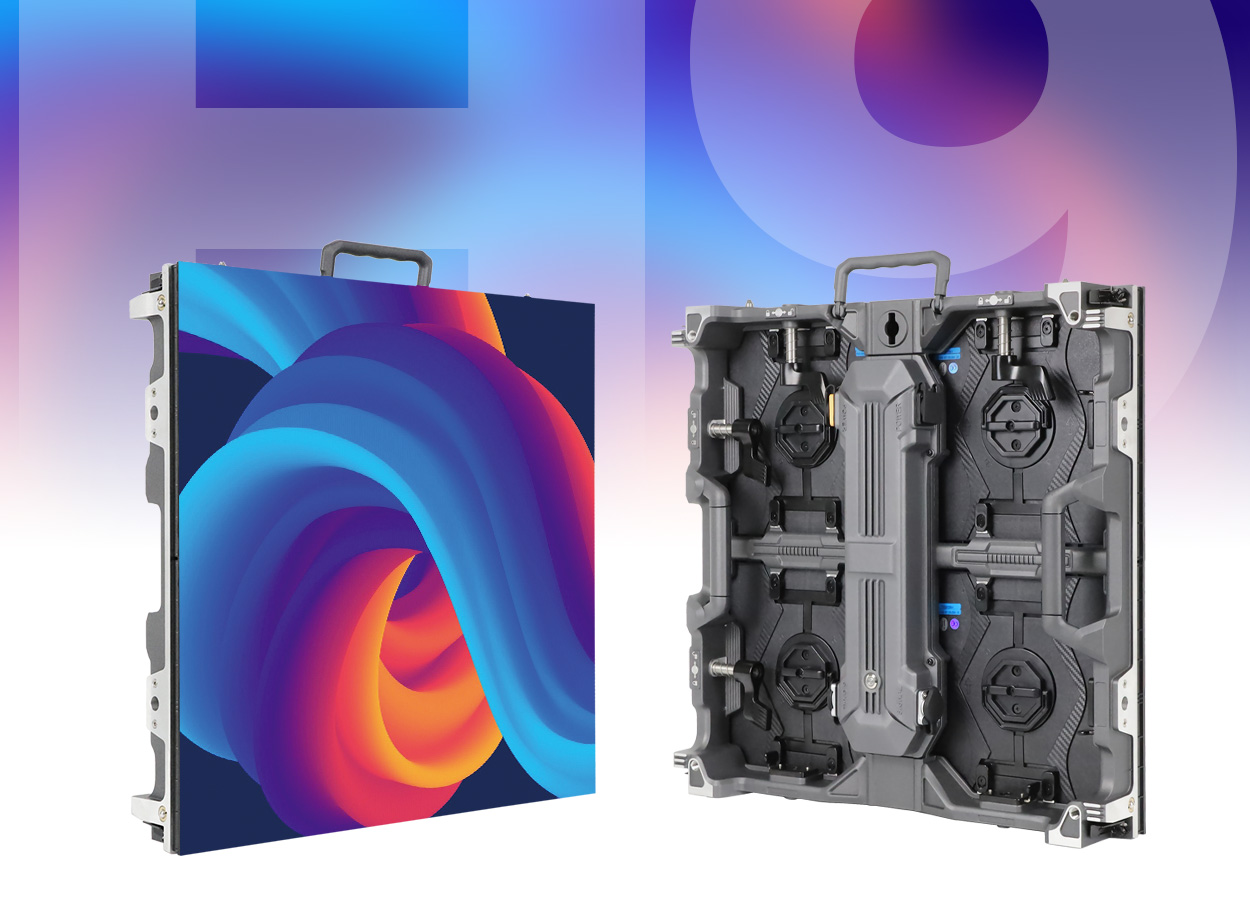
EagerLED’s EA500H9 is a square rental LED board with a 500 × 500 mm cabinet and 250 × 250 mm modules. The manufacturer describes quick locks, magnetic module access, a detachable rear power box and optional arc locks. Its application list covers stage backdrops, touring shows, exhibitions and conference sets. EA500H9 product overview
For a rental operator, the purchase decision extends beyond the first wall. List the jobs the inventory is expected to cover and the layouts that recur. A compact exhibition set may place different demands on access and content than a broad stage backdrop. Use those real jobs to choose a configuration and a service package that the warehouse can identify and prepare consistently.
The EA500H9 name covers several indoor and outdoor variants. Retain their full references in your comparison and decide which variants, if any, will share an inventory. A common cabinet outline makes the equipment look related, but it does not establish interchangeable modules, settings or replacement electronics across the whole family.
Exact models are more useful than a headline range
The published page contains standard outdoor, black-LED outdoor and indoor tables. The following selection preserves each model suffix and the corresponding brightness. This is particularly useful when comparing alternatives that are all described informally as H9 rental panels.
| Exact EA500H9 model | Configuration in source | Brightness | Cabinet weight |
|---|---|---|---|
| EA500H9-OP2.6 | Standard outdoor P2.6 | 4,500 cd/m² | 7.5 kg |
| EA500H9-OP2.97 | Standard outdoor P2.97 | 4,500 cd/m² | 7.5 kg |
| EA500H9-OP3.91-16S | Standard outdoor P3.91 | 4,800 cd/m² | 7.5 kg |
| EA500H9-OP3.91-8S | Standard outdoor P3.91 | 6,000 cd/m² | 7.5 kg |
| EA500H9-OP2.6-B | Black-LED outdoor P2.6 | 3,000 cd/m² | 7.5 kg |
| EA500H9-OP2.97-B | Black-LED outdoor P2.97 | 3,000 cd/m² | 7.5 kg |
| EA500H9-OP3.91-16S-B | Black-LED outdoor P3.91 | 3,000 cd/m² | 7.5 kg |
| EA500H9-OP3.91-8S-B | Black-LED outdoor P3.91 | 4,000 cd/m² | 7.5 kg |
| EA500H9-iP1.56 | Indoor P1.56 GOB | 700 cd/m² | 7 kg |
| EA500H9-iP1.95 | Indoor P1.95 GOB | 750 cd/m² | 7 kg |
| EA500H9-iP2.6 | Indoor P2.6 GOB | 750 cd/m² | 7 kg |
| EA500H9-iP2.97 | Indoor P2.97 | 750 cd/m² | 7 kg |
These values follow the EA500H9 specification tables. The page’s introductory ranges are broader than its detailed model list, and the introduction gives an indoor weight range while the table lists 7 kg. Use the tabled model values for this comparison and request a dedicated sheet for any other proposed configuration.
The outdoor tables specify IP65 front protection and IP54 rear protection. Indoor entries list IP31. These are separate ratings for the relevant versions, so the indoor cabinet should not inherit an outdoor description merely because it uses the same family name. EA500H9 protection by variant
The supplier should identify the chosen configuration in the acceptance documents and on the service-parts schedule. If a replacement variant is proposed during ordering, have the change reviewed against the original brief. Keep the approved model reference visible in packing and job preparation records.
Build the screen map around the square format
The manufacturer describes die-cast aluminium cabinets on a 250 mm module grid. It also documents horizontal and vertical combinations between EA500H9 and the 500 × 1000 mm EA1000H9. Stepped and staggered H9 arrangements are part of the published installation description. EA500H9 mixed assembly
Prepare a cabinet map for each common rental layout. Show the visible screen boundary and any gaps or stepped edges that belong to the design. Give the media team the approved map so it can prepare content for the actual display area. Keep the mapping information with the installation notes, particularly when the same inventory serves both conventional walls and irregular scenery.
For mixed layouts, identify the square and tall cabinet positions rather than asking the crew to infer them from the overall dimensions. Have EagerLED confirm the selected variants and their shared operating configuration. Review the EA1000H9 cabinet guide for the taller companion. You can compare other formats through the rental LED display collection.
Decide whether curved work belongs in the initial scope
EA500H9 has an optional high-precision arc lock for curved assembly. The official text describes mixing flat and curved sections within a screen. It does not provide a numerical angle range for every configuration. EA500H9 optional arc locks
If curved jobs are part of the intended work, include their drawings before selecting accessories. Record the required direction of the curve and show the nearby stage or stand structure. Ask the supplier to confirm the supported geometry and identify the arc-lock hardware in the equipment schedule.
If the approved scope contains only flat walls, keep future curved arrangements as separate proposals until the hardware and support arrangement have been checked. This keeps the warehouse instructions tied to builds the team has actually reviewed. The presence of a curved product illustration should not become an improvised site instruction.
Give the warehouse a spare-parts plan it can follow
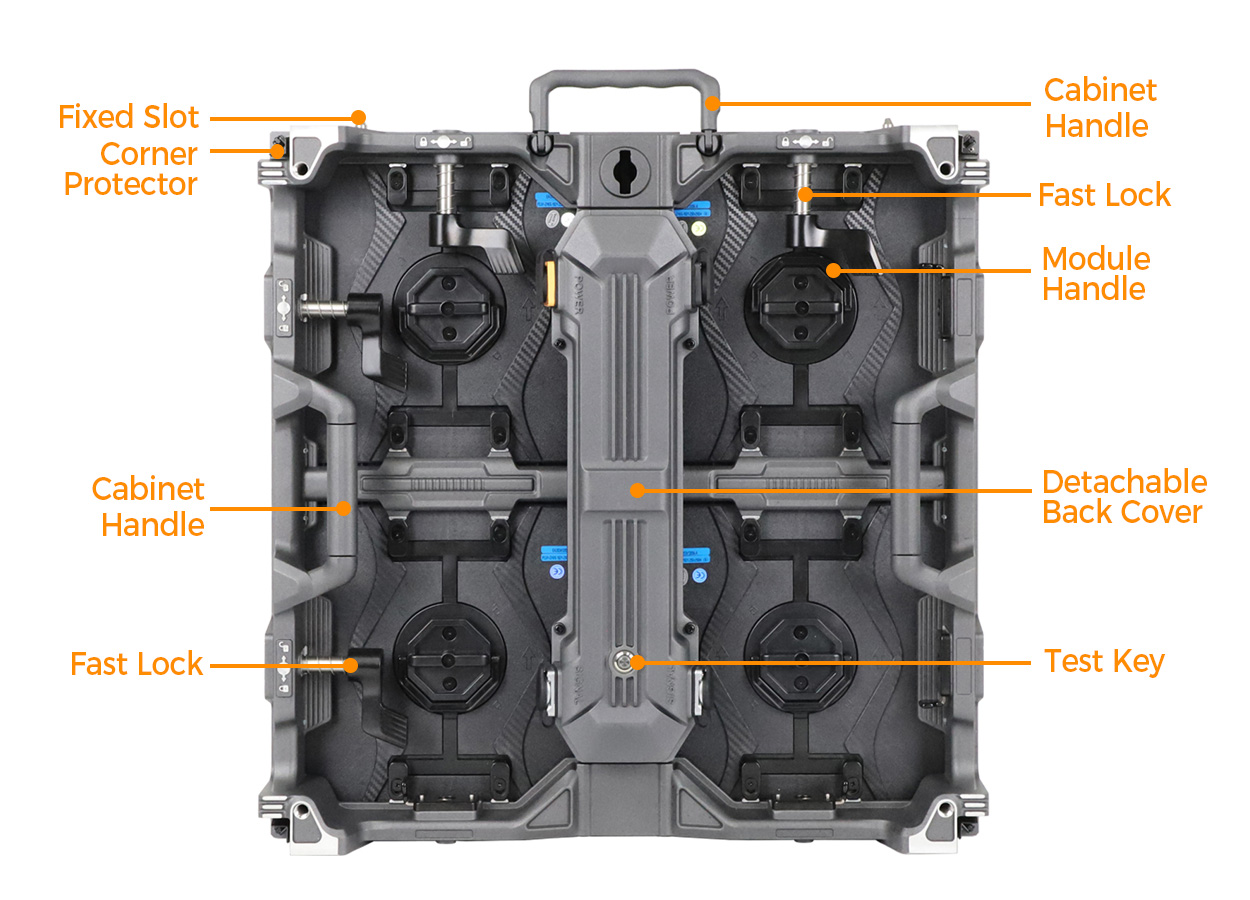
The source describes magnetic modules removable from the viewing side and a power box that opens from the rear. It places the power supply and HUB board in a detachable rear assembly using a HUB connection. Cabinet illustrations identify the handles, quick locks, module handles and corner protectors. EA500H9 service and handling features
Use a service demonstration to decide what belongs in the job kit. Ask technicians to identify the component being replaced, the appropriate spare and the tools required. Include access restrictions from a typical event layout. A module replacement at the display face and work on the rear box may need different working space, even though both tasks concern the same cabinet.
Have the supplier document which spare parts match the ordered variants and how the operating configuration is retained after replacement. Store that information with the inventory record. Where the fleet contains more than one variant, make the distinction clear in the picking list so a visually similar spare does not leave with the wrong job.
For returns, establish a check before the next booking. It can cover the displayed image, connectors, locks and corner protection, followed by the packing arrangement. Record damage against the cabinet reference and separate equipment awaiting service from equipment approved for the next build. These are operating choices for the rental team, not features promised by the product specification.
Include the content and camera workflow in acceptance
EA500H9’s tables list a viewing angle of 140°, refresh frequency of at least 3,840 Hz, frame frequency of at least 60 Hz and 14-bit grayscale. Those parameters help identify the proposed display configuration. EA500H9 image parameters
Bring the material the team expects to display to the demonstration. Conference text, event graphics and video should be assessed from the intended audience positions. If the wall will appear on camera, review the recording setup as part of the same exercise and retain the accepted settings. A source claim about image stability does not replace checking the cameras and content used on a particular job.
Purchase and handover decisions
| Operating need | Decision to make | Record to retain |
|---|---|---|
| Repeated indoor presentations | Chosen indoor pitch and content requirements | Exact indoor variant and accepted sample content |
| Outdoor event work | Standard or black-LED configuration | Full outdoor suffix and protection specification |
| Irregular screen shapes | Square-only or mixed H9 layout | Approved cabinet and media maps |
| Curved bookings | Required curve hardware and geometry | Supplier-approved arrangement and setup instructions |
| Fast service preparation | Matching spares and required tools | Variant-specific picking list |
| Reliable equipment returns | Inspection and repair responsibilities | Cabinet service record and release check |
Use the project quote form to submit the layouts and operating brief. For an existing fleet, also identify any EA500H8 equipment or other cabinets already in use so the supplier can review the proposed system without assuming compatibility.
Frequently asked questions
What is the cabinet size of EA500H9?
The source lists 500 × 500 mm cabinets with 250 × 250 mm modules for the tabled configurations. EA500H9 dimensions
Do all outdoor P3.91 variants have the same brightness?
No. The scan suffix and B suffix distinguish entries with different published brightness values. Keep the complete model reference when comparing or ordering. EA500H9 outdoor specifications
Are the LED modules accessible from the front?
The source describes magnetic modules removable from the viewing side. It separately describes a rear-opening power box, so review access for both service areas. EA500H9 service access
Can EA500H9 form part of a larger H9 wall?
EagerLED documents mixed assembly with EA1000H9. Confirm the exact variants and approved arrangement before adding the combination to the rental inventory’s build instructions. EA500H9 mixed installation
CHECK THE DETAILS
Sources & references
Source pages can change. Access dates record when they were consulted.
- EA500H9 model tables and service features Accessed 28 September 2026
Discuss EA500H9 for your project.
Share the application, destination and screen dimensions to request a configuration and written quotation.
Request a project quote