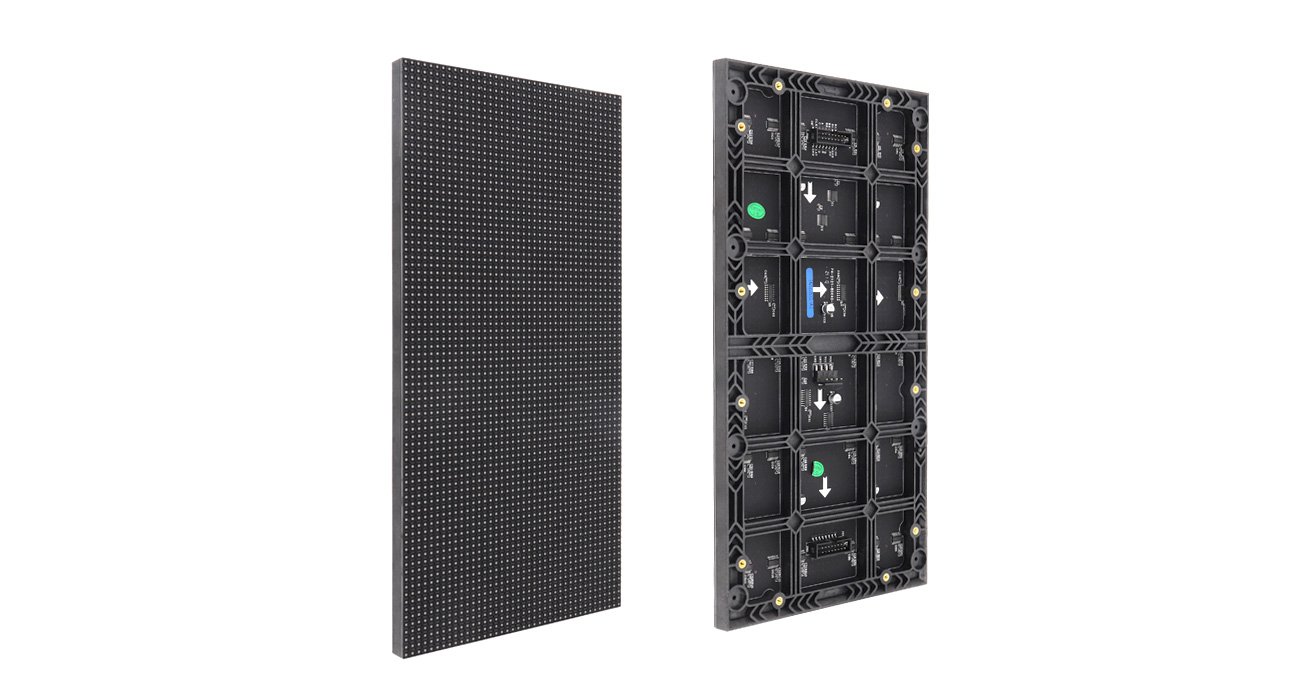
Choose the module that belongs in the system
EagerLED’s indoor LED module range covers several board sizes, pitches and connection arrangements for indoor fixed and rental screens. A module is the replaceable image panel within a larger display. Selecting one requires more than a pitch label: its physical dimensions, pixel matrix, mounting points and electrical interface must suit the cabinet and control configuration. Indoor module specifications.
For a new display, choose the required screen dimensions and useful pixel count before completing the module layout. For a replacement, begin with photographs of the installed module’s front, back, labels and connectors. Two panels with the same P2.5 label may have different dimensions or connections. Neither should be assumed to fit the other’s position.
This page compares documented families rather than assigning a new product model number to the range. The LED module category separates indoor panels from outdoor, flexible and protected-surface options. A buyer seeking a finished wall can also review the EA640F2, where the cabinet and module arrangement are specified together.
The 320 × 160 mm indoor series
The first source table lists seven rectangular SMD variants. All use a 320 × 160 mm footprint and list 3840 Hz refresh. Pixel matrix, brightness and driving duty vary by row. Rectangular module table.
| Pitch | Module resolution | Driving duty | Listed brightness |
|---|---|---|---|
| P1.25 | 256 × 128 pixels | 1/64 | 600 nits |
| P1.53 | 208 × 104 pixels | 1/52 | 600 nits |
| P1.86 | 172 × 86 pixels | 1/43 | 600 nits |
| P2 | 160 × 80 pixels | 1/40 | 700 nits |
| P2.5 | 128 × 64 pixels | 1/32 | 800 nits |
| P3.076 | 104 × 52 pixels | 1/26 | 800 nits |
| P4 | 80 × 40 pixels | 1/20 | 700 nits |
These values belong to the named 320 × 160 mm series. For example, the source separately lists a P2 panel measuring 256 × 128 mm with a 128 × 64 matrix, 1/32 duty and 800-nit brightness. That is a different row from the P2 panel above. Matching only the nominal pitch would miss both the physical size and operating differences. Indoor module variants.
Use the actual module matrix when calculating a proposed screen. Multiply its horizontal and vertical pixel counts by the number of modules in each direction, then have the integrator confirm the resulting map. Rounded pitch names are useful identifiers but do not capture the complete image grid.
Square modules: cable and HUB variants
The source provides separate 250 × 250 mm tables for cable connection and HUB connection. They share the following pitch and matrix combinations, but the P3.91 brightness entry differs. Both tables show refresh entries of 3840–7680 Hz. Treat that as a configuration range to confirm, not a promise that any receiving setup will run at the upper value. Square module tables.
| Pitch label | Module resolution | Duty | Cable-series brightness | HUB-series brightness |
|---|---|---|---|---|
| P1.56 GOB | 160 × 160 pixels | 1/40 | 750 nits | 750 nits |
| P1.95 GOB | 128 × 128 pixels | 1/32 | 800 nits | 800 nits |
| P2.6 GOB | 96 × 96 pixels | 1/32 | 750 nits | 750 nits |
| P2.97 | 84 × 84 pixels | 1/28 | 800 nits | 800 nits |
| P3.91 | 64 × 64 pixels | 1/16 | 800 nits | 700 nits |
The GOB labels apply to the first three rows in these tables. Do not extend the label to the other pitches without a separate confirmation. The GOB module family provides a more focused comparison when surface protection is a project requirement.
Cable connection and HUB connection need their own compatibility checks. Obtain connector positions, pin assignments and the approved mating arrangement. A matching footprint cannot establish that a panel will connect to an existing adapter board. Keep the complete supplier designation on the purchase order so a later replacement does not lose the distinction.
The indoor range also contains a separate flexible 250 × 250 mm HUB series. Its documented refresh is 3840 Hz, and its pitches begin at P1.95. Flexible HUB specifications. A flexible panel’s presence in the same catalog does not establish that it can replace a rigid panel in a cabinet. Review the flexible module family if the display follows a curved support.
Other footprints and room layouts
The source includes HUB modules measuring 300 × 168.75 mm and 320 × 180 mm, as well as additional 320 × 160 mm HUB entries. It also lists smaller formats such as 160 × 160, 192 × 192, 256 × 128 and 256 × 256 mm. These groups have their own matrices and operating rows. They are useful alternatives when the physical screen grid or an existing cabinet fixes the choice of module size. Indoor module sizes.
The 300 × 168.75 mm HUB group lists P0.93, P1.25, P1.56 and P1.87, with matrices of 320 × 180, 240 × 135, 192 × 108 and 160 × 90 pixels respectively. Its brightness entry is 300–800 nits. Keep that group-specific range separate from the fixed brightness entries in the rectangular and square tables above. Additional indoor formats.
For a presentation wall, review the actual content at the proposed screen resolution. For a retail interior, test the images and lettering under the room lighting. A demonstration made only of vivid full-screen video may conceal whether the selected matrix is sufficient for everyday text. The module specification should follow the content requirement and physical design together.
Integration and replacement checks
| Purchase situation | Start with | Confirm before ordering |
|---|---|---|
| A new indoor cabinet | Finished wall size and useful pixel count | Module footprint, cabinet grid and complete control map |
| A failed module replacement | Existing labels and front/rear photographs | Pixel matrix, scan setting, connector arrangement and mounting points |
| A cable-to-HUB design change | Proposed adapter and cabinet drawings | Approved electrical interface and service sequence |
| A GOB requirement | Exact surface-treated row | Surface finish, cleaning instructions and matching spare construction |
| A curved display | Approved support geometry | Flexible variant, bend direction and retention arrangement |
Power and data cables are only part of a complete installation. Ask the supplier to identify the required power supply, input characteristics, receiving configuration and any adapter hardware for the selected module. The catalog’s general statement about supplied cables does not establish that no other components are needed.
Module removal also depends on the cabinet. Front service is not proven for every indoor panel merely because some finished walls use front access. Check whether the proposed mounting and wiring allow removal from the viewing side or require rear access. Keep a sample of the supplied fasteners and record the replacement procedure at handover.
When replacing a small area of an existing screen, review the visual match beside the retained modules. Provide the original production information if available and ask what calibration work is required. Test the replacement using uniform fields and the normal playlist before treating the repair as complete.
Indoor module questions
Is pitch enough to order a replacement?
No. Include the exact dimensions, pixel resolution, scan duty, connector arrangement and module identification. Photographs of the current panel help the supplier confirm the correct row.
Do all square modules use GOB?
The cable and HUB tables mark P1.56, P1.95 and P2.6 as GOB. P2.97 and P3.91 are listed without that label. Request the specific construction you need. Square module tables.
Does every indoor variant run at 7680 Hz?
The 250 × 250 mm rigid cable and HUB tables list a 3840–7680 Hz range. The other tables discussed here list 3840 Hz. Confirm the delivered operating configuration for the exact module. Indoor refresh specifications.
Can an indoor module be used outside in a custom box?
This catalog identifies indoor module families. A custom enclosure does not by itself establish the module or assembly’s outdoor suitability. Select an appropriate outdoor specification with the system designer.
What belongs in a module inquiry?
Use the module quote request with the required quantity, exact module row and whether the task is a new build or a repair. Include cabinet photographs, the control arrangement and any need for matched spares so the proposal covers a usable configuration.
CHECK THE DETAILS
Sources & references
Source pages can change. Access dates record when they were consulted.
- Indoor module specifications Accessed 28 September 2026
Discuss Indoor LED module family for your project.
Share the application, destination and screen dimensions to request a configuration and written quotation.
Request a project quote